About KiriKiri Configuration

"KiriKiri Configuration" is a tool that allows you to configure KiriKiri options via a GUI.
It exists to allow end users (secondary users) to perform troubleshooting and performance adjustments to some extent by themselves.
The engine configuration is started by adding -userconf to the KiriKiri executable file.

The option names, available values, and descriptions use information built into the KiriKiri core.

About Configuration Files

There are two types of KiriKiri configuration files. One is placed in the same location as the KiriKiri executable, with the extension changed to cf. The other is placed in the data storage location specified by the command line option -datapath, with the extension changed to cfu.
The .cfu file is generated by the "Engine Configuration (-userconf)" for end users.
If settings are made with the Releaser, a .cf file is created. Note that the set options will not be reflected unless this file is distributed along with the KiriKiri core.
These files will be created if they do not exist when the engine configuration is started and the OK button is pressed.

Note
Inside the configuration file, descriptions of "name=\"value\"" are listed line by line. The "value" part is a sequence of \xNN, where each represents a Unicode code point value. For example, if opt="\x61\x62\x63\x3042\x3044\x3046" is written, this represents "abc" followed by Japanese characters. Please be careful when writing to these files from other applications.
Note that if you write it without using the \xNN format, such as opt="abc(Japanese characters)", the KiriKiri core can recognize it correctly, but the Engine Configuration tool may not recognize this format and might not work as expected. Double quotes on both sides of the value are also required.

Engine Configuration Screen

The engine configuration screen is as follows.
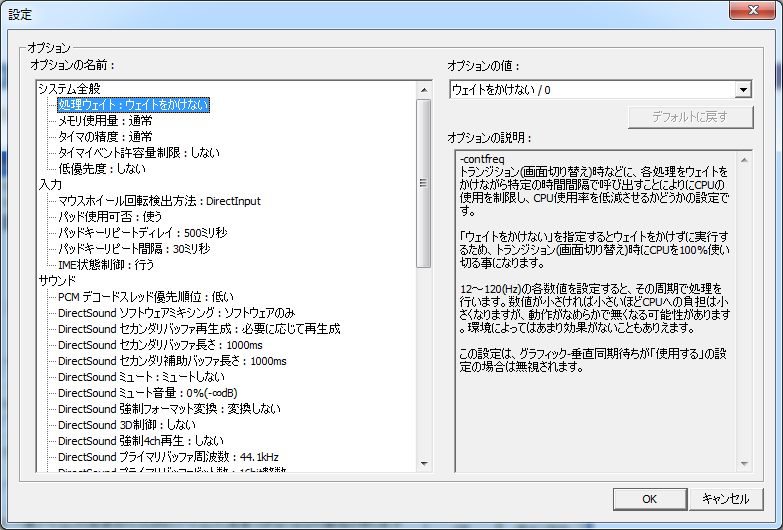
Configure.png

"Option Name"
Displays a list of options that can be set.
Please also refer to the Command Line Options.
"Option Value"
Displays a list of values that can be set for the option selected in "Option Name".
Please select one.
"Option Description"
Displays a description for the option selected in "Option Name".