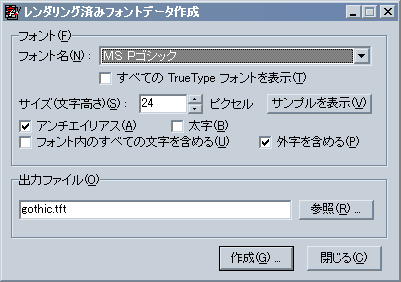
When you run the Prerendered Font Data Creation Tool (krkrfont.exe in the tools folder), the screen above will be displayed.
- "Font Name"
- Specifies the name of the font to be used as the source for creating prerendered font data. If you want to create a vertical writing font, select a font with an @ symbol at the beginning.
- "Show all TrueType fonts"
- If not checked, only fonts with Japanese character types will be listed in "Font Name", but if checked, all TrueType fonts will be displayed.
- "Size (Character Height)"
- Specifies the size (character height) of the prerendered font to be created in pixels.
- "Antialiasing"
- Specifies whether to perform antialiasing. Antialiasing makes the font smoother.
- "Bold"
- Specifies whether to make the font bold. This can only be checked on Windows NT-based OSs (NT4, 2000, XP, Vista, 7, etc.).
- "Include all characters in font"
- Specifies whether to include all characters present in the font. This can only be checked on Windows NT-based OSs (excluding NT4).
When checked, all characters included in the font will be output.
When not checked, only characters corresponding to Shift JIS and half-width alphanumeric/kana will be output.
NoteThe behavior when not checked depends on the locale in which this tool is running. Normally, when running on Japanese Windows, it means only characters corresponding to Shift JIS, etc., will be output. (However, the author does not know for sure as they do not have anything other than Japanese Windows.)
- "Include external characters"
- Specifies whether to include external characters. This can only be selected on Windows NT-based OSs (excluding NT4). On other OSs, it will always be checked.
External characters can be created using the "Private Character Editor" included with Windows. - "Sample"
- Displays a sample of the prerendered font created with the selected conditions. In this "Sample", you can check all the characters to be output.
- "Output File"
- Specifies the file to be output. The extension of the output file will be .tft. Clicking "Browse" allows you to specify the file in a dialog box.
- "Create"
- Creates the prerendered font file.
- "Close"
- Exits this tool.